

Objective:
Create a lightweight WordPress plugin that lets site editors display tall screenshots inside a fixed-height viewport, with smooth scrolling animation, simple page builder compatibility, and no dependency on jQuery or third-party frontend libraries.
At Shift8 Web, our work often sits at the intersection of web design presentation and practical implementation. A common design need is showing long screenshots, full-page website captures, mobile layouts, landing pages, dashboards, or portfolio pieces, without forcing the visitor to scroll through a huge static image.
You can download Shift8 Scrollshot here
Introduction to WordPress Plugin Development
WordPress plugin development solves real problems for sites handling traffic and revenue. We build plugins when core WordPress cannot meet specific workflow requirements or when existing solutions create performance bottlenecks. A custom authentication plugin beats third-party solutions that add 200ms page load time. A tailored e-commerce integration prevents cart abandonment from slow checkout flows. Plugin development targets measurable business metrics: conversion rates, page speed, and operational efficiency.
Experienced WordPress developers follow established patterns to avoid common failures. We hook into WordPress core using add_action() and add_filter() at the right priority levels. Plugin files live in /wp-content/plugins/custom-plugin/ with proper header comments and activation hooks. We test against WordPress core updates and popular themes before deployment. Database changes require migration scripts and rollback plans. Security means sanitizing inputs with sanitize_text_field() and validating nonces for state changes:
// Safe form processing
if (wp_verify_nonce($_POST['nonce'], 'custom_action')) {
    $value = sanitize_text_field($_POST['user_input']);
    update_option('custom_setting', $value);
}
Custom plugins deliver measurable results when built for specific problems. A membership site plugin reduces login friction and increases user retention by 15%. An inventory sync plugin eliminates manual data entry and prevents overselling. Performance optimization plugins cut server response time from 800ms to 300ms. We measure success with real metrics: page load speed, error rates, and user completion flows. Start small with a single feature, test thoroughly on staging, then deploy with monitoring in place.
What The Plugin Does
Shift8 ScrollShot creates a viewport around a tall image and animates the image vertically inside that frame. The result is a simple “scrolling screenshot” effect that works well for portfolio sections, case studies, SaaS interface previews, before-and-after examples, or long-page website mockups.
The editor only needs two CSS classes:
<div
  class="s8-scrollshot"
  data-mode="auto"
  data-duration="18000"
  data-end-pause="2000"
  data-frame="browser"
  data-viewport-height="620"
>
  <img
    class="s8-scrollshot__image"
    src="/wp-content/uploads/project-homepage-full.png"
    alt="Full homepage screenshot for client project"
  >
</div>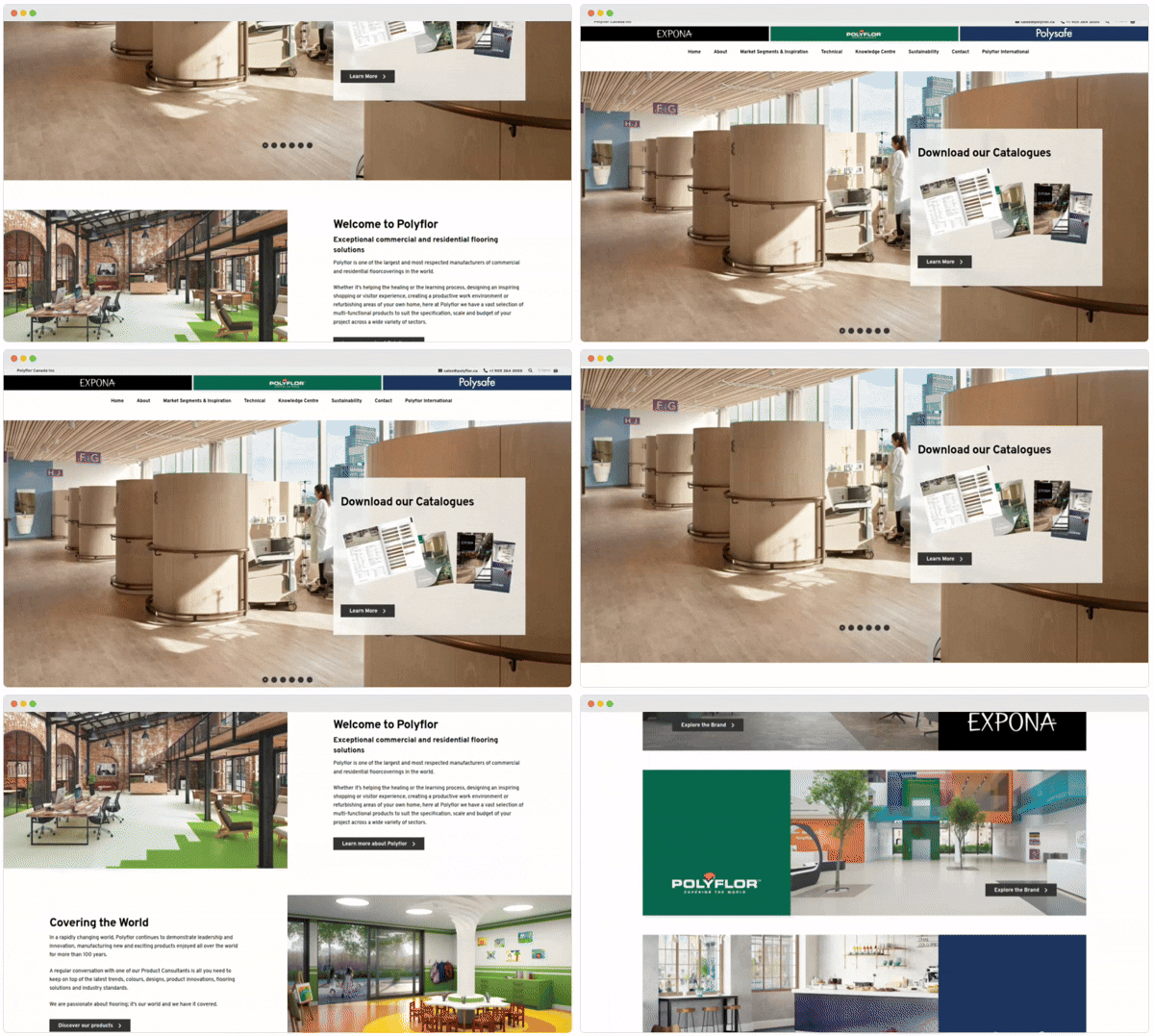
The outer element gets s8-scrollshot, and the image gets s8-scrollshot__image. Configuration is handled through optional data-* attributes, which keeps the implementation friendly for both page builders and custom templates.
Technical Approach to Plugin Development
The plugin is intentionally small. The PHP layer handles WordPress integration, while the frontend behavior is handled by vanilla JavaScript and CSS.
On the WordPress side, the plugin registers frontend assets using the standard wp_enqueue_scripts hook. The CSS and JavaScript are loaded with the plugin version constant, which keeps cache busting tied to the release version.
wp_enqueue_style(
    'shift8-scrollshot',
    SHIFT8_SCROLLSHOT_URL . 'frontend-assets/css/scrollshot.css',
    array(),
    SHIFT8_SCROLLSHOT_VERSION
);

wp_enqueue_script(
    'shift8-scrollshot',
    SHIFT8_SCROLLSHOT_URL . 'frontend-assets/js/scrollshot.js',
    array(),
    SHIFT8_SCROLLSHOT_VERSION,
    array(
        'in_footer' => true,
        'strategy'  => 'defer',
    )
);
The assets are enqueued globally on the frontend. This was a deliberate choice. Many page builders store layout content in serialized post meta rather than regular post_content, which makes reliable server-side detection difficult. Since the assets are small and the JavaScript exits immediately if no matching elements exist, unconditional enqueueing keeps the plugin compatible with Gutenberg, Elementor, Bricks, custom templates, and hand-coded markup.
Frontend Architecture
The frontend is written in plain JavaScript. No jQuery, no animation library, and no external runtime dependency.
When the page loads, the script scans for .s8-scrollshot wrappers. Each wrapper gets its own ScrollShot controller instance, which means multiple scrolling screenshots can exist independently on the same page.
function boot() {
  var wrappers = document.querySelectorAll('.s8-scrollshot');

  if (!wrappers.length) {
    return;
  }

  for (var i = 0; i < wrappers.length; i++) {
    new ScrollShot(wrappers[i]);
  }
}
Each instance does the following:
- Finds the image inside the wrapper.
- Reads configuration from data-* attributes.
- Builds a viewport wrapper if one does not already exist.
- Measures the image’s rendered dimensions.
- Calculates the maximum vertical travel distance.
- Starts either auto-scroll mode or scroll-linked mode.
The plugin reads configuration from both the wrapper and the image, with wrapper values taking priority. This helps with page builders where custom attributes may be easier to place on one element than another.
function attr(key) {
  return wrapD[key] !== undefined ? wrapD[key]
       : imgD[key] !== undefined ? imgD[key]
       : undefined;
}
The viewport itself is created dynamically. If the markup already contains a viewport, the plugin can reuse it. Otherwise, it wraps the existing image content in a generated .s8-scrollshot__viewport element.
var existingViewport = this.wrapper.querySelector('.s8-scrollshot__viewport');

if (existingViewport) {
  this.viewport = existingViewport;
} else {
  this.viewport = document.createElement('div');
  this.viewport.className = 's8-scrollshot__viewport';

  while (this.wrapper.firstChild) {
    this.viewport.appendChild(this.wrapper.firstChild);
  }

  this.wrapper.appendChild(this.viewport);
}
Measuring Image Travel
One of the more important implementation details is how the plugin calculates movement distance. Instead of relying only on offsetHeight, it uses the image’s natural dimensions and rendered width to determine the expected rendered height.
That matters because page builders, themes, and responsive layouts can constrain image dimensions in different ways.
var renderedW = this.image.offsetWidth;

if (renderedW <= 0) {
  return;
}

var renderedH = this.image.naturalHeight * (renderedW / this.image.naturalWidth);

this._maxTravel = Math.max(0, renderedH - this.settings.viewportHeight);
If the image is shorter than the configured viewport height, the maximum travel distance becomes 0, and the plugin does not animate. That avoids awkward empty movement or unnecessary work.
Animation Modes
Shift8 ScrollShot supports two animation modes.
Auto Mode
Auto mode uses the browser’s native Web Animations API. The plugin calculates keyframes dynamically based on the image height, viewport height, duration, pause timing, easing, and reverse behavior. This allows the image to scroll down, pause, and optionally return to the top in a loop.
var top = 'translateY(0)';
var bottom = 'translateY(-' + travel + 'px)';

keyframes = [
  { transform: top,    offset: 0,  easing: 'linear' },
  { transform: top,    offset: p1, easing: s.easing },
  { transform: bottom, offset: p2, easing: 'linear' },
  { transform: bottom, offset: p3, easing: s.easing },
  { transform: top,    offset: 1 },
];

this._animation = this.image.animate(keyframes, {
  duration: s.duration,
  easing: 'linear',
  iterations: Infinity,
});
The pause at the top and bottom is calculated as a fraction of the full animation duration. This keeps timing proportional whether the animation is fast or slow.
var holdFrac = clamp(s.endPause / s.duration, 0, 0.4);The plugin also uses IntersectionObserver to pause the animation when the element is off-screen.
this._observer = new IntersectionObserver(function (entries) {
  var visible = entries[0].isIntersecting;
  self._visible = visible;

  if (self._animation) {
    visible ? self._animation.play() : self._animation.pause();
  }
}, { threshold: 0 });

this._observer.observe(this.wrapper);
Scroll-Linked Mode
Scroll-linked mode connects the image position to the visitor’s page scroll. It uses requestAnimationFrame() with a passive scroll listener, which keeps updates efficient and avoids doing unnecessary layout work during scroll events.
this._scrollBound = function () {
  if (self._rafId) {
    return;
  }

  self._rafId = requestAnimationFrame(function () {
    self._rafId = null;
    self.applyScrollProgress();
  });
};

window.addEventListener('scroll', this._scrollBound, { passive: true });
The scroll progress is calculated from the wrapper’s position in the viewport, then mapped to the maximum image travel distance.
var rect = this.wrapper.getBoundingClientRect();
var winH = window.innerHeight;
var progress = clamp((winH - rect.top) / (winH + rect.height), 0, 1);
var y = progress * this._maxTravel;

this.image.style.transform = 'translateY(-' + y + 'px)';
Both modes use transform: translateY() for movement, which is better suited for smooth browser rendering than animating layout properties like top or margin.
Accessibility And Motion Preferences
The plugin respects prefers-reduced-motion. If a visitor has reduced motion enabled at the operating system or browser level, the animation is disabled and the image remains static.
var reducedMotion = window.matchMedia('(prefers-reduced-motion: reduce)');

if (reducedMotion.matches) {
  return;
}
There is also a CSS fallback to make sure animation-related styles are neutralized for reduced-motion users.
@media (prefers-reduced-motion: reduce) {
  .s8-scrollshot__image {
    will-change: auto;
    transform: none !important;
    animation: none !important;
  }
}
Images retain their normal alt attribute, so the effect does not remove content from assistive technology. The plugin adds visual behavior around the image, but it does not replace the image with a canvas, background image, or inaccessible rendering layer.
Optional Browser Frame
A common use case for this plugin is showing website screenshots. To support that, Shift8 ScrollShot includes an optional browser-style frame.
Setting data-frame=”browser” adds a lightweight CSS-rendered chrome bar with the familiar three-dot visual treatment. This is done entirely with CSS and DOM elements, not image assets.
var chrome = document.createElement('div');
chrome.className = 's8-scrollshot__chrome';
chrome.innerHTML = '<span></span><span></span><span></span>';

this.wrapper.insertBefore(chrome, this.viewport);
The styling is intentionally simple and theme-friendly.
.s8-scrollshot__chrome {
  display: flex;
  align-items: center;
  gap: 6px;
  padding: 10px 14px;
  background: #e8e8e8;
  border-radius: 8px 8px 0 0;
}

.s8-scrollshot__chrome span {
  display: block;
  width: 12px;
  height: 12px;
  border-radius: 50%;
}

.s8-scrollshot__chrome span:nth-child(1) { background: #ff5f57; }
.s8-scrollshot__chrome span:nth-child(2) { background: #febc2e; }
.s8-scrollshot__chrome span:nth-child(3) { background: #28c840; }
Performance Considerations
The plugin avoids heavy runtime dependencies. There are no third-party frontend libraries, no jQuery requirement, and no bundled animation framework.
The main browser APIs used are:
- Web Animations API for auto-scroll animation.
- IntersectionObserver to pause animation when the element is off-screen.
- requestAnimationFrame for scroll-linked updates.
- matchMedia for prefers-reduced-motion.
- Standard DOM APIs for setup and measurement.
Resize handling is debounced so the plugin does not recalculate layout on every resize event.
function debounce(fn, delay) {
  var timer;

  return function () {
    clearTimeout(timer);
    timer = setTimeout(fn, delay);
  };
}
The resize callback recalculates image travel distance and restarts the animation cleanly.
this._onResize = debounce(function () {
  self.measure();
  self.restart();
}, 200);

window.addEventListener('resize', this._onResize);
Open Source And Development Tooling
The runtime plugin does not depend on third-party open source JavaScript libraries. That was intentional. WordPress sites often already carry a lot of frontend weight, so the goal was to keep this feature self-contained and lightweight.
For development and testing, the project uses PHPUnit and Brain Monkey. PHPUnit provides the test runner, while Brain Monkey allows us to test WordPress hook and enqueue behavior without needing a full WordPress environment for every unit test.
A simplified version of the enqueue test looks like this:
Functionswhen('wp_enqueue_style')->alias(function () use (&$enqueued) {
    $enqueued['style'] = func_get_args();
});

Functionswhen('wp_enqueue_script')->alias(function () use (&$enqueued) {
    $enqueued['script'] = func_get_args();
});

$plugin = Shift8_ScrollShot_Plugin::get_instance();
$plugin->enqueue_assets();

$this->assertSame('shift8-scrollshot', $enqueued['style'][0]);
$this->assertSame('shift8-scrollshot', $enqueued['script'][0]);
This gives us coverage for the WordPress integration layer without requiring a full browser or WordPress installation for every test run.
Development Services and Support
WordPress development shops handle more than basic site builds. They ship custom code, maintain production systems, and integrate third-party services that keep business workflows running. We combine server management, database optimization, and API integration to deliver systems that handle real traffic loads.
Custom WordPress development means writing actual PHP code instead of dragging widgets around. We build custom post types in functions.php, create database tables with dbDelta(), and hook into WordPress core actions. Plugin development requires understanding the WordPress filesystem structure: wp-content/plugins/, wp-content/mu-plugins/, and how autoloaders work with Composer. Here’s what custom plugin scaffolding looks like:
<?php
/**
 * Plugin Name: Custom Business Logic
 * Version: 1.0.0
 */

register_activation_hook(__FILE__, 'create_custom_tables');

function create_custom_tables() {
    global $wpdb;
    $table_name = $wpdb->prefix . 'business_data';

    $charset_collate = $wpdb->get_charset_collate();
    $sql = "CREATE TABLE $table_name (
        id mediumint(9) NOT NULL AUTO_INCREMENT,
        user_id bigint(20) NOT NULL,
        data_field varchar(255) NOT NULL,
        PRIMARY KEY (id)
    ) $charset_collate;";

    require_once(ABSPATH . 'wp-admin/includes/upgrade.php');
    dbDelta($sql);
}
Production maintenance means monitoring actual server metrics and fixing issues before they cause downtime. We track WordPress core updates, plugin compatibility, and database performance through wp-cli commands and server logs. Security monitoring includes file integrity checks, failed login attempts in /var/log/auth.log, and database query analysis. Performance optimization involves caching layer configuration, CDN setup, and database query optimization:
# WordPress maintenance commands
wp core update
wp plugin update --all --exclude=problematic-plugin
wp db optimize

# Monitor database performance
wp db query "SHOW PROCESSLIST;"
wp db query "SELECT * FROM information_schema.INNODB_TRX;"
Project delivery requires version control, staging environments, and deployment scripts that work reliably. We use Git hooks for automated testing, staging sites for client review, and blue-green deployments to minimize downtime. Database migrations need rollback plans. File uploads need backup strategies. Third-party API integrations need rate limit handling and error logging:
# Deployment with rollback capability
git checkout production
git pull origin main
wp db export backup-$(date +%Y%m%d).sql
wp search-replace https://staging.example.com https://example.com
wp cache flush

# Verify deployment health
curl -sI https://example.com | grep "HTTP/2 200"
wp db check
Why We Built It This Way
As a web design and development agency in Toronto, we prioritize understanding and aligning with client expectations throughout the project lifecycle, especially for complex projects that benefit from in-person collaboration and regional expertise. Our approach emphasizes delivering comprehensive services—including custom WordPress design, web development, and plugin development—to support long-term ROI and strategic business goals. We recognize the importance of competitive pricing for small and medium-sized businesses, and our clients are praising our work for its quality and reliability. Our expertise in SEO-friendly, optimized, and scalable WordPress web development services ensures that every project benefits from a tailored SEO strategy for improved visibility and performance. We view digital transformation as a crucial driver of business growth, and our web development services are designed to facilitate this process. Working with a consulting company or web design agencies like ours provides strategic and creative solutions that go beyond standard offerings. Notable agencies such as Azuro Digital, Kinex Media, Major Tom, and WPWeb Infotech are recognized as top WordPress developers and strong contenders in Canada, highlighting the value of choosing developers in Canada for quality and regional precision. Understanding project cost and budgeting for ongoing maintenance—typically 15-25% of the initial investment annually—is essential for sustainable website development. For readers seeking more information, we recommend consulting a comprehensive guide to top WordPress developers in Canada to make informed decisions.
Shift8 ScrollShot was built around that balance.
For editors, the workflow is just classes and optional data attributes. For developers, the implementation is small, inspectable, and framework-agnostic. For site performance, the plugin avoids unnecessary dependencies and pauses work when the effect is not visible.
The result is a focused WordPress plugin that does one job: make tall screenshots easier to present in a polished, controlled, and accessible way.
Conclusion and Next Steps
WordPress development requires technical skill, design sense, and clear business requirements. You need the right development team to build fast, secure sites that convert visitors. Custom themes, plugin development, and WooCommerce integration are core services that separate your site from template-based competitors.
A solid WordPress development team delivers end-to-end services from initial setup to ongoing maintenance. We handle security updates, performance optimization, and feature rollouts. This keeps your site stable and aligned with business goals. Follow WordPress coding standards, stay current with PHP versions, and prioritize site speed. These practices deliver results that work long-term.
Ready to build or improve your WordPress site? Research development teams with proven track records. Define your technical requirements and performance targets. Work with developers who understand optimization, proper caching strategies, and secure deployment processes. The right technical partner turns your website into a revenue-generating asset that scales with your business.